Retrieval Augmented Generation
CS123, Intro to AI
| Topics | |
|---|---|
| Overview of AI | Neural networks and deep learning |
| AI Problem Solving Revisited Machine Learning—Part 1 Applications of AI | Generative AI +Prompt engineering |
| Machine Learning—Part 2 | RAG & Custom chatbot creation |
| History of AI + Midterm | Social and ethical issues of AI Final |
Contents
What is RAG?Why Use it?What problems does it solve?How RAG worksSetup Time (The "Ingestion" Pipeline)Run Time (The "Inference" Pipeline)References
What is RAG?
Retrieval Augmented Generation (RAG) is an advanced AI technique that enhances the capabilities of large language models (LLMs) by integrating an information retrieval system. This system fetches relevant information from external sources, which the LLM then uses to generate more accurate and reliable responses.
Why Use it?
Improved Accuracy: By grounding the model on external sources of knowledge, RAG helps in providing more accurate and up-to-date information.
Cost-Effective: It allows organizations to improve LLM outputs without the need for expensive retraining.
Enhanced Control: Organizations can control the data sources used by the LLM, ensuring that the generated responses are relevant and authoritative.
What problems does it solve?
Hallucinations: Try asking a GPT chatbot questions about topics that it probably hasn't been trained on, like:
Your educational history, or work resume.
Specific information about a particular course at a particular college.
Local current news.
History or policies of a lesser-known company or organization.
If it doesn't know the answer, it will sometimes just make one up!
Out-of-date information: The model (sometimes called a foundation model), was trained at some point in time and it's base knowledge ends at the time it's training data was obtained. Most modern AI chatbots will supplement that base knowledge with a web search, but will still sometimes give outdated information.
Access to private data: The model was trained on public data, so any private data, like patient health care records, student records or HR records would not be included; neither would proprietary data like company marketing strategy, manufacturing processes or computer code.
Citations: The way an LLM is trained doesn't provide transparency into where specific information came from. But, data from a RAG knowledge store can be tagged with it's source1.
Try getting a response with Gemini, Chat GPT or other chatbots, they will give you references, but those aren't necesarily it's sources— but they could be sources for the RAG-like supplemental information.
How RAG works
A RAG system operates in two distinct timeframes: Setup Time (when a developer create the RAG chatbot and upload files) and Run Time (when a user asks a question).
(This explaination continues below the diagram.)
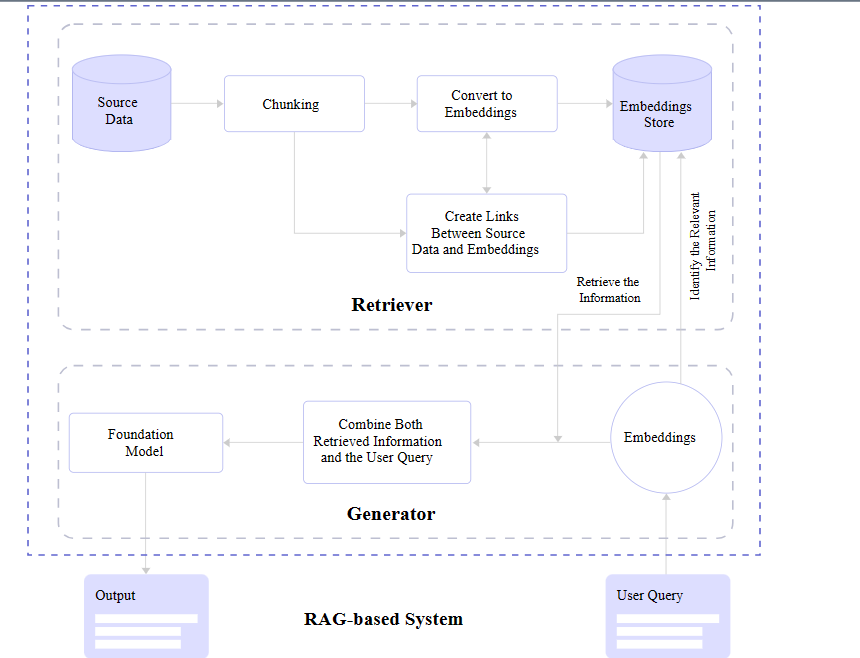
Diagram from: A Simple Guide To Retrieval Augmented Generation Language Models—Smashing Magazine
Setup Time (The "Ingestion" Pipeline)
This entire phase is dedicated to building the Retriever's memory. The Generator (the LLM) is not involved yet.
Upload: You provide files to the source data store (shown in the retriever section of the diagram).
Chunking: The system reads your files and chops them into small, manageable pieces (e.g., 3-5 paragraphs each) called "chunks".
Embedding: Each chunk is sent to an Embeddings Model (a specialized, non-LLM AI) that translates the text into a list of numbers (vectors) representing its meaning.
The sysem makes a map linking embeddings to the source documents so they can be referenced in output from a user prompt.
Storage: These vectors are saved into the Embeddings Store (Vector Database). This database now holds a mathematical map of your documents.
Analogy: This is like a librarian reading all the new books and filing index cards for them in the library catalog. The books aren't being read to answer a question yet; they are just being organized so they can be found later.
Run Time (The "Inference" Pipeline)
This is where the user interacts with the system. Both the Retriever and the Generator work together in real-time.
User Query: The user asks, "What is the attendance policy?".
Query Embedding: The Retriever converts this question into numbers (vectors) using the same model from the "ingestion" pipeline.
Vector Search: The Retriever compares the question's numbers against the numbers in the Embeddings Store to find the closest matches—e.g., it finds the chunk from the syllabus about "Attendance".
The search request is shown in the line labeled "Identify the Relevant Information" in the diagram.
The search result is shown in the line labeled "Retrieve the Information" in the diagram.
More about search. RAG systems can use either lexical search, vector (semantic) search or both:
Lexical Search (Keyword Search)
This is the "traditional" searchthat looks for exact word matches.
Vector search is notoriously bad at finding exact matches for specific identifiers. If a user asks for "Error Code 504" or "Part Number XJ-900," vector search might return "System Failure" or "Model X" because they are conceptually similar.Semantic Search (Vector Search) This uses embeddings to find matches based on meaning (semantics) and intent rather than word matching.
This solves the "vocabulary mismatch" problem. If a user searches for "how to fix a broken screen," it can find a document titled "Display Replacement Guide" even though none of the words match exactly.
Hybrid Search (Best of both worlds). Most advanced RAG systems now use Hybrid Search, which runs both a lexical search and a semantic search in parallel.
The system retrieves results from both methods and then uses a reranker algorithm to combine and sort them into a single list for the LLM.
Augmentation: This is a crucial step, it's the "magic" that makes the system work! The system retrieves a text chunk from the search and combines it with the original question (labeld "combine both retrieval information" in the diagram) and the user query (context injection).
Instead of sending just the question to the AI, the system augments the prompt. It pastes the text found by the Retriever alongside the original user question.
Context from our chat: This is where the "Open Book" analogy applies. The system is handing the model the specific page it needs to read.
Analogy:
Without RAG: Taking a test with your memory only.
With RAG: An open-book test. You find the relevant page (Retrieval), put the book next to your exam paper (Augmentation), and write the answer based on the book (Generation).
Generation: The LLM (Foundation Model) finally receives this combined prompt. It reads the retrieved syllabus chunk and generates an answer: "According to the syllabus, attendance is not graded".
Analogy: This is the librarian (Retriever) looking up the index card, running to the shelf, grabbing the specific page, and handing it to the student (Generator) so they can write their essay.
References
A Simple Guide To Retrieval Augmented Generation Language Models—Joas Pambou, 2024, Smashing Magazine
What is Retrieval-Augmented Generation?— Kim Martineau with video by Marina Danilevsky, IBM Research, 2023.
Note: Microsoft Copilot with GPT-4 (2024) and Gemini 3 (2025) was used to draft parts of these notes.
 Intro to AI lecture notes by Brian Bird, written in 2024, updated in , are licensed under a Creative Commons Attribution-ShareAlike 4.0 International License.