Intro to the Course and to JavaScript
CS133JS Beginning Programming: JavaScript
| Topics by Week | |
|---|---|
| 1. Intro to JavaScript programming | 6. Arrays |
| 2. Functions, Variable scope, Operators and Expressions | 7. Objects and Object Constructors |
| 3. Conditional Statements: if and switch | 8. Web Page I/O |
| 4. Repetition: while, do while, and for | 9. Review |
| 5. Midterm | 10. Final |
Table of Contents
IntroductionAbout Your InstructorCourse PrerequisitesStatic pages vs. dynamic (interactive) pagesExamplesExerciseServer-side vs. client side codeExamplesExerciseIntro to JavaScript Course TourReference
Introduction
About Your Instructor
Why I like to create software
Professional history
What I teach
LCC's Software Development degree
Course Prerequisites
You need to know a little bit of HTML which is taught in CIS 195, Web Authoring, and which can be taken at the same time as this course. These are the specific parts of HTML you will need to know:
HTML elements and tags—what they are in general
Attributes (key-value pairs inside the opening tag of a element)
Headings
Paragraphs and divs
Links (
<a>elements)Images
Forms and input elements
A good way to review these topics or to get a head-start on them if you are currently taking CIS 195 is by doing the tutorials at W3Schools.
Static pages vs. dynamic (interactive) pages
Examples
Facebook all dynamic (likes, comments, add friend, etc.)
LTD static pages (about us) and dynamic (trip planner)
Exercise
LCC web site – which parts are interactive?
Server-side vs. client side code
Server-side code vs. client side (browser) code
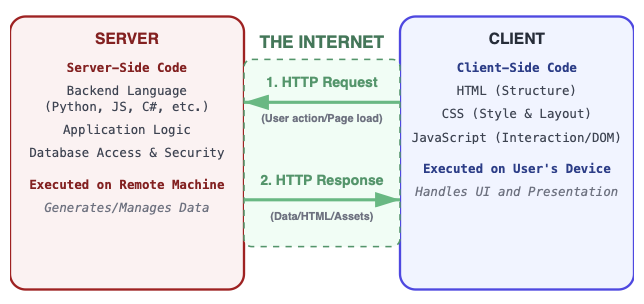
What needs to happen on the server?
Storing data
Interaction with other users
Member information
Heavy processing tasks
What can be done in the client?
Light-weight processing, examples:
Temperature and unit conversion
Time zone conversion
Single player games
Check user input before storing it
Animations
Examples
Revisit these and discuss what might run on the server and what might run in the browser.
Exercise
LCC web site – which parts could run on the server? Which parts in the browser?
Intro to JavaScript
Provides interactivity using client-side code.
Originally designed to just run in web browsers (client-side code) but now used everywhere including: server-side, desktop, and mobile thanks to Node.js.
A completely different language from Java, but has some similarities
JS is interpreted, dynamically typed, and multi-paradigm (procedural & Object Oriented, imperative & functional). We’ll explain these things later.
Guided Exercise: Hello world
Set up your computer to do JavaScript development.
Install Chrome if it isn't already installed on your computer.
Open Chrome, press F12, and select console. We'll put this code in the console. (Almost any browser will have a similar feature in it's developer menu)
Enter the code below. (This is simple, but not very useful.)
document.write("<p>Hello world!</p>");Lets add a variable named
name. A variable is a thing we can use to store information. Now you'll be able to change the name, but you'll need to change the code to do it :-(
xxxxxxxxxxvar name = "world"; // can change to “other names”document.write("<p>Hello " + name + "!</p>");
Finally, we'll add a way for a user to enter information. We do that by adding code that prompts the user for input.
xxxxxxxxxxvar name = prompt("Please enter your name");document.write("<p>Hello " + name + "!</p>");Now it's almost useful :-)
Let's talk about how this works by looking at some key pieces of the code:
varWe use this JavaScript keyword to declare a variable. Declaring a variable means announcing to JavaScript that this is a new variable that we will be using. (Later we'll learn to useletto declare variables).promptA function built into JavaScript that pops up a dialog box that displays a message on the web page and lets the user enter some input.=The assignment operator. It takes the information (in this case a name) coming from the prompt on the right and puts it into the variable on the left.
Note: in computer programming, the direction information flows with the=symbol, right to left, is the opposite of algebra.
Course Tour
Syllabus – quick overview
Reading and Quizzes
Purpose of quizzes isn’t testing, it’s focus and accountability.
Lab assignments
Part 1 will usually be a set of practice exercises.
Part 2 will require problem-solving.
What is problem solving?
Why is it important?
You will upload your solutions to Moodle and usually to citstudent as well.
Code reviews
Each lab assignment has a beta and production version. Code reviews are done on the beta version.
One reason we do code reviews: they are used by development teams in the real world.
You will be assigned two lab partners
Let me know if you have a preference for a lab partner
Lab partners will each be doing a different version of each lab assignment.
Look at the code review guide (there's a link in the Moodle page fly-out).
Reference
JavaScript Reserved Words—W3Schools
The reserved words are the "vocabulary" of JavaScript.
 Beginning JavaScript Lecture Notes by Brian Bird, written in 2018, revised in , are licensed under a Creative Commons Attribution-ShareAlike 4.0 International License.