Statistical learning: the setting and the estimator object in scikit-learn
Datasets
Scikit-learn deals with learning information from one or more datasets that are represented as 2D arrays. They can be understood as a list of multi-dimensional observations. We say that the first axis of these arrays is the samples axis, while the second is the features axis.
A simple example shipped with scikit-learn: iris dataset
>>> from sklearn import datasets
>>> iris = datasets.load_iris()
>>> data = iris.data
>>> data.shape
(150, 4)
It is made of 150 observations of irises, each described by 4 features: their sepal and petal length and width, as detailed in iris.DESCR.
When the data is not initially in the (n_samples, n_features) shape, it needs to be preprocessed in order to be used by scikit-learn.
An example of reshaping data would be the digits dataset
The digits dataset is made of 1797 8x8 images of hand-written digits
>>> digits = datasets.load_digits()
>>> digits.images.shape
(1797, 8, 8)
>>> import matplotlib.pyplot as plt
>>> plt.imshow(digits.images[-1],
...            cmap=plt.cm.gray_r)
<...>
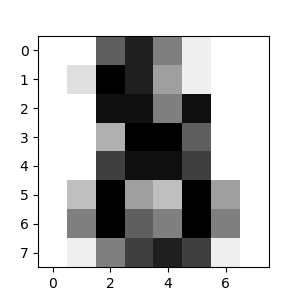
To use this dataset with scikit-learn, we transform each 8x8 image into a feature vector of length 64
>>> data = digits.images.reshape(
...     (digits.images.shape[0], -1)
... )
Estimators objects
Fitting data: the main API implemented by scikit-learn is that of the estimator. An estimator is any object that learns from data; it may be a classification, regression or clustering algorithm or a transformer that extracts/filters useful features from raw data.
All estimator objects expose a fit method that takes a dataset (usually a 2-d array):
>>> estimator.fit(data)
Estimator parameters: All the parameters of an estimator can be set when it is instantiated or by modifying the corresponding attribute:
>>> estimator = Estimator(param1=1, param2=2)
>>> estimator.param1
1
Estimated parameters: When data is fitted with an estimator, parameters are estimated from the data at hand. All the estimated parameters are attributes of the estimator object ending by an underscore:
>>> estimator.estimated_param_
Enhanced Data Handling in scikit-learn 1.7
Since this tutorial was originally written for scikit-learn 1.4, several enhancements have been made to data handling capabilities:
Array API Compatibility
scikit-learn 1.7 now supports Array API-compliant inputs, meaning you can use data from libraries like PyTorch and CuPy directly:
>>> import torch
>>> from sklearn.linear_model import LinearRegression
>>> X = torch.tensor([[1, 2], [3, 4], [5, 6]])
>>> y = torch.tensor([3, 7, 11])
>>> reg = LinearRegression()
>>> reg.fit(X, y)  # Works seamlessly with PyTorch tensors
Enhanced Sparse Data Support
scikit-learn now supports both traditional sparse matrices (scipy.sparse.spmatrix) and the newer sparse arrays (scipy.sparse.sparray):
>>> from scipy.sparse import csr_array
>>> from sklearn.svm import SVC
>>> X_sparse = csr_array([[0, 1], [1, 0]])
>>> y = [0, 1]
>>> clf = SVC()
>>> clf.fit(X_sparse, y)  # Works with both sparse formats
These enhancements maintain full backward compatibility while providing more flexibility in data input formats.
This original version of this tutorial was written by scikit-learn developers under the BSD License.
The code examples and text were updated for scikit-learn version 1.7 by Brian Bird using Claude Sonet 4, 10/19/2025